
Formatting Requirements
Technical papers submitted for presentation at the Annual Conference of the IGLC should not only present interesting technical material and be well written, but also be formatted properly. Formatting of technical papers is important to those interested in seeing proceedings that have a consistent appearance, which in turn makes it easier for readers to at least skim through all texts. We next present the formatting instructions for authors wishing to submit a paper for the forthcoming Conference.
Measurement Units
Our standard is to use metric units. Should you wish to use US or other units, please list their metric equivalent first and then your units in parentheses.
Word Processor
Document File Type
Prepare and submit the final version of your paper as a Microsoft Word (Word, in short) document (.docx file extension). You must use one of the provided templates to do so.
The editors of the proceedings reserve the right to make minor editorial changes to papers, following these specifications, to make them better suited for printing. Therefore, you must submit a stand-alone Word document with all figures embedded and not a file in .pdf or other file format. The editors will post-process your paper to produce a .pdf file in color for online posting.
Page Setup
You must use the page setup of the template document exactly as-is, including:
- Page size
- Page rotation
- Page margins
A change to any of these may be a reason for the editors to reject your paper.
Headers and Footers
Leave the headers and footers as they are in the template. Do not type the title, author names, DOI or track in them: the IGLC adds the reference with the DOI, the title, the authors, the track and the page numbers when the paper is published. The empty space above the title on the first page is kept free for the reference; do not remove it.
Styles
'Styles' have been defined and are used in the template document. Please apply them to format all your text as well. Use only the styles in the template. Do not manually change any text's font, font size, or other characteristics. Do not alter any style definitions.
If you are not familiar with styles in Word please follow tutorials available online (Microsoft, n.d. a, b) or seek assistance from your organization's IT support. Learning to use styles and other Word features now will save you a lot of time in the future.
Styles – Headings
- 'Title' is used only for the paper's title
- 'Heading 1'
- 'Heading 2'
- 'Heading 3'
Avoid using further subheadings and note that, contrary to the text paragraphs that are 'Justified,' heading styles are 'Aligned Text Left' to prevent exaggerated spacing when a heading is longer than one line.
Styles – Figures and Tables
- Figures use style 'Figure' with format 'Paragraph' then 'Line and Page Breaks' set at 'Keep with next.'
- A figure caption is placed below the figure and centered on the page. Use the style 'Figure Caption.'
- Text in a table should be formatted using the 'Table heading' style for the table's heading, and the 'Table body' style for all other text (it is acceptable to left-align, center, right-align, or justify this text).
- In the IGLC 35 template, Insert → Table → Quick Tables → IGLC table gives a table with its caption, formatted correctly. New tables use the IGLC Table style, which formats the cells like 'Table body'; apply 'Table heading' to the header row.
- A table caption is placed above the table and centered on the page. The style to use is 'Table caption.'
- Tables should be kept to one page. Do not allow rows to break across pages. If needed, split a multi-page table into smaller ones, each of which fitting on one page and labelled with its own caption and table heading.
Styles – Body
- 'Authors' is used (only) for formatting the authors' names under the title of the paper.
- Body text paragraphs following headings, figures, tables, bullet lists or quotes shall be formatted with the style 'Text First.'
- Subsequent paragraphs following directly after a text paragraph shall be formatted with the style 'Text Running.'
- Quotations (i.e., direct excerpts from other sources) shall be placed in double quotes, followed by the reference and page number(s).
- Numbered or bulleted lists should be formatted with 'List Numbered' or 'List Bullet.' The paragraph following a list is in 'Text First' format.
- Footnotes to detail an author's affiliation(s) on page 1 shall be formatted with the style 'Footnote Text.' Each author has exactly one footnote; several affiliations go in that footnote, separated by semicolons.
- References at the end of the paper shall be formatted with the style 'References.'
Making Words or Phrases Stand Out
If you wish to make a word or phrase stand out in a paragraph, use bold or italics; the styles Strong and Emphasis do the same and may be used too. In the references, use italics for the titles of books and journals.
Extra Line Breaks
There should be no extra line breaks or empty lines between paragraphs in the paper. If the paper is formatted correctly using the pre-defined styles, there will be no need to add extra line breaks. Thus, if you see the need to add extra line breaks you have likely not applied the styles correctly.
You will see paragraph markers when you set Word to 'Show tab marks'. You can see which styles have been applied by looking at the left-hand margin when you view your file in Outline or Draft mode, provided you have set the file's Option > Advanced > Display with a 'Style area pane width…' to 3 cm or so.
Figures and Tables
Placement
Each figure or table should follow the paragraph that first mentions it. Ensure that each figure or table caption fits on the same page as the figure or table it refers to. Once you have edited your paper (admittedly, this is an iterative process), you may need to move text towards the start of the paper to use white space left by Word, and thus move figures and tables to the subsequent page. In any case, figures and tables should follow their first mention in the text.
When you insert a figure in the text, ensure the figure's wrapping style is 'In Line with Text' and then apply the paragraph style 'Figure' to the figure. Do not lay it out with 'Behind text' or 'In front of text' text wrapping.
Use of Color
Figures and tables in the paper may be in color, but please ensure that they are also readable in black-and-white, since a reader may print your paper in black-and-white only.
Figure Requirements
- Acceptable image file types are Joint Photographic Experts Group (.jpg or .jpeg), Encapsulated Postscript (.eps), Portable Network Graphics (.png), and bitmaps (.bmp).
- Drawings made using lines, boxes, text, etc., within Word cannot be reproduced effectively, so please do not make drawings using Word.
- To ensure print quality, images should be at least 1,800 pixels wide if they are full-page width or 900 pixels wide if they are half-page width.
It is preferred that figures are sized to match the full-page width or to match the half-page width so you can arrange them side by side to save space if needed.
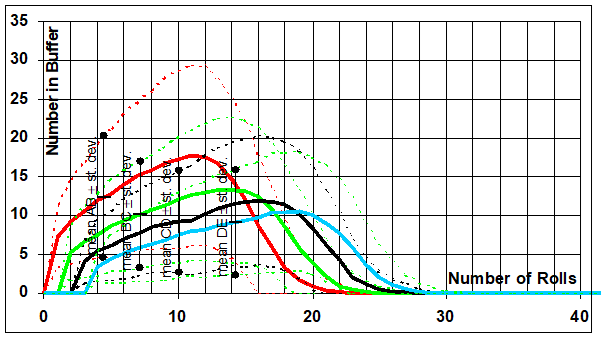
Figure 1: Average ± Standard Deviation of Buffer Size Relative to Number of Rolls after 1,000-Iteration Simulation where all Players have a fast Die
Table Requirements
Tables should have a thick top and bottom border, a thin border under headers, and generally no vertical borders.
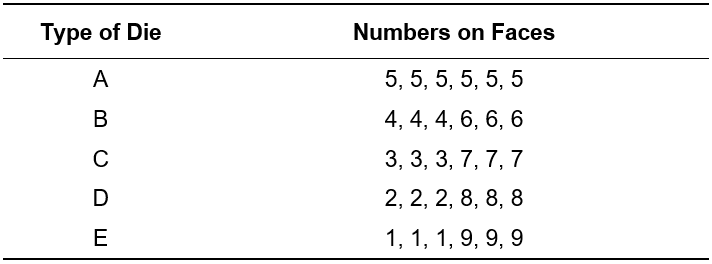
Table 1: Variability of Available Dies (Table 1 in Tommelein et al. 1999)
Preparing for Submission
First submission
Anonymizing Paper for Review
All IGLC papers will go through a double-blind peer review process, and authors will be offered feedback to improve their paper. To allow for a double-blind review, authors should not reveal their identities upon their paper's first submittal or resubmittal during the review process. Instead of listing names and affiliations on page 1, use as many XXXXXX placeholders as needed to ensure that the paper will not exceed its page limit when preparing the camera-ready version.
Anonymity should be maintained during the two-stage review process: (1) upon first submission for review and (2) after peer-review feedback has been taken into account, upon submission of the authors' improved paper for final review. The conference organizers will then notify the authors whether their paper has been accepted. Once a paper has been accepted, authors should add their full name and affiliations and verify once more that their paper is formatted according to the template with specifications, before submitting their final camera-ready paper.
Camera Ready Paper
Before uploading the camera-ready paper, check it on the Check your paper page, check and fix what it reports, and upload the PDF report together with the paper. You do not need to add a DOI or page numbers: the IGLC adds them at publication.
Check Your Paper
The Check your paper page checks a Word file against the template: the styles, the title, the authors and their footnotes (affiliation, email, ORCID iD), the abstract and keywords, the required headings, the page size and margins, empty lines, figure wrapping and captions, formatting set by hand, changed style definitions, the submission checklist and, for papers under review, anonymity. Upload the PDF of your paper as well (saved from Word) to have the number of pages checked. Save the report as a PDF and upload it with your paper at every submission. The report does not accept or reject the paper: it lists what the check found, for you to check and fix, and what it cannot check (content, language, references in APA style, units, figures in black and white and more), which you check yourself with the submission checklist. A short report does not mean the paper meets the requirements; the chairs and editors read every paper.